Setup LLM Provider in VS Code Extensions (Cline, Kilocode)
All models are accessed through Cloudflare AI Gateway (
agent-shared-gateway). Users only need their personal gateway token (cfut_...) — no provider keys required.
👤 User Guide
Step 1 — Get your Gateway Token
API Token: [Ask your admin — starts with cfut_...]
Step 2 — Configure the Extension
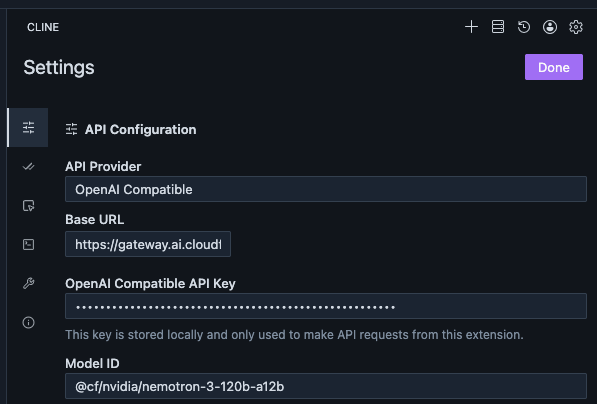
Cline:
- Click the Cline icon in the Activity Bar
- Click the Settings (gear) icon at the top of the Cline panel
- Under Provider, select OpenAI Compatible
- Fill in the fields below
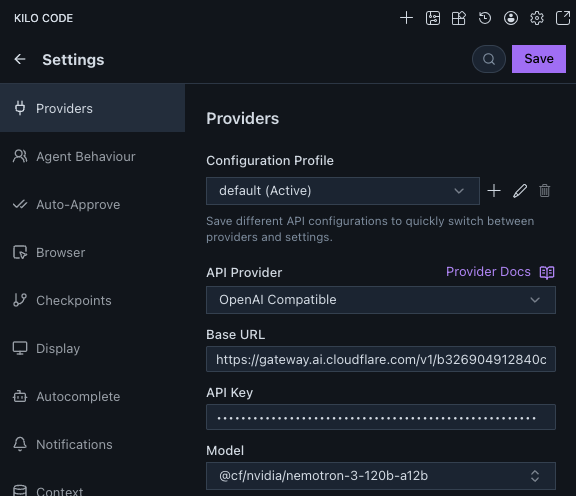
Kilocode:
- Click the Kilocode icon in the Activity Bar
- Click your profile/account icon (bottom-left of the Kilocode panel) → Settings
- Go to the Providers tab
- Click + Add Provider and select OpenAI Compatible
- Fill in the fields below
| Field | What to enter |
|---|---|
| Provider | OpenAI Compatible |
| Base URL | (copy from the model table below — include the full URL) |
| API Key | (your gateway token: cfut_...) |
| Model | (type the Model ID manually — see note below) |
Important — Model field: The model list will not auto-populate. You must type the Model ID directly into the model field (e.g.
minimaxai/minimax-m2-maas). Do not wait for a dropdown.
API Key: Enter the
cfut_...token as-is. The extension sends it asAuthorization: Bearer cfut_...which the gateway accepts.
Step 3 — Select a Model
Use the tables below to pick a Base URL + Model ID pair. Every model uses OpenAI Compatible as the provider type.
Step 4 — Verify it Works
After saving, open a new chat in the extension and send a short message (e.g. “say hi”). If you see a response, the setup is complete. If you get an auth error, double-check the API Key. If you get a model error, make sure you typed the Model ID exactly as shown.
Screenshots
Kilocode:
Cline:
Available Models
Google Gemini (via Google AI Studio)
Base URL:
https://gateway.ai.cloudflare.com/v1/b326904912840c25f63808a1d1e479aa/agent-shared-gateway/google-ai-studio/v1beta/openai
| Model | Model ID | Input | Output | Context | Notes |
|---|---|---|---|---|---|
| Gemini 3.1 Pro | gemini-3.1-pro-preview |
$2 / $4* | $12 / $18* | 1M | Best quality; preview |
| Gemini 3 Flash | gemini-3-flash-preview |
$0.50 | $3 | 1M | Fast & balanced; preview |
| Gemini 3.1 Flash Lite | gemini-3.1-flash-lite-preview |
$0.25 | $1.50 | 1M | Cheapest; preview |
Prices per million tokens (USD). * = higher price applies when input > 200K tokens.
Model IDs verified working via CF AI Gateway on 2026-04-09.
GCP Vertex AI MaaS — MiniMax, Kimi, GLM
Base URL:
https://gateway.ai.cloudflare.com/v1/b326904912840c25f63808a1d1e479aa/agent-shared-gateway/google-vertex-ai/v1/projects/mcps-testing-cloudflare-ai/locations/global/endpoints/openapi
| Model | Model ID | Input | Output | Context | Notes |
|---|---|---|---|---|---|
| MiniMax-M2 | minimaxai/minimax-m2-maas |
$0.30 | $1.20 | 1M | Coding & agentic; 10B active / 230B total MoE |
| Kimi K2 Thinking | moonshotai/kimi-k2-thinking-maas |
$0.60 | $2.50 | 256K | Thinking model; 32B active / 1T total MoE |
| GLM-5 | zai-org/glm-5-maas |
$1.00 | $3.20 | 128K | Latest GLM; 40B active / 744B total |
| GLM-4.7 | zai-org/glm-4.7-maas |
$0.60 | $2.20 | 128K | Stable; good multilingual |
Prices per million tokens (USD). Source: GCP Vertex AI partner model pricing.
All model IDs verified working via CF AI Gateway on 2026-04-09.
Newer versions (MiniMax-M2.5, Kimi K2.5, GLM-5.1) exist in GCP Model Garden but are deploy-only — no MaaS endpoint yet.
Cloudflare Workers AI (CF-hosted, no GCP cost)
Base URL:
https://gateway.ai.cloudflare.com/v1/b326904912840c25f63808a1d1e479aa/agent-shared-gateway/workers-ai/v1
| Model | Model ID | Cost | Context | Notes |
|---|---|---|---|---|
| GLM 5.2 | @cf/zai-org/glm-5.2 |
CF Neurons | 262K | CF-hosted version of GLM 5.2 |
| Nvidia Nemotron 3 120B | @cf/nvidia/nemotron-3-120b-a12b |
CF Neurons | 128K | 12B active MoE |
| Moonshot Kimi K2.5 | @cf/moonshotai/kimi-k2.5 |
CF Neurons | 256K | CF-hosted version of Kimi K2.5 |
| GLM 4.7 Flash | @cf/zai-org/glm-4.7-flash |
CF Neurons | 131K | Fast, multilingual |
Workers AI uses Cloudflare’s own infrastructure (not GCP). Billed in CF Neurons ($0.011/1K Neurons) with a free daily allowance. These are different model instances from the GCP Vertex AI ones above.
Anthropic Claude (via CF Wholesale)
Claude runs through the gateway’s /compat endpoint using Cloudflare wholesale billing — no Anthropic API key (BYOK) required. Authenticate with your personal cfut_... gateway token, exactly like every other model here.
Provider Type: OpenAI Compatible Base URL:
https://gateway.ai.cloudflare.com/v1/b326904912840c25f63808a1d1e479aa/agent-shared-gateway/compat
| Model | Model ID | Input | Output |
|---|---|---|---|
| Claude Opus 4.8 | anthropic/claude-opus-4.8 |
see dashboard | see dashboard |
| Claude Sonnet 4.6 | anthropic/claude-sonnet-4.6 |
$3.00 | $15.00 |
Indicative list prices per million tokens (USD). Actual usage is drawn from CF wholesale credits — check the AI Gateway dashboard for the wholesale rate.
Heads-up: The
/compatpath bills through CF wholesale credits. If you hit402 Insufficient wholesale credits, top up credits on the AI Gateway Cloudflare dashboard before Claude will serve.
Which Model Should I Use?
| Goal | Recommended Model |
|---|---|
| Best quality / complex reasoning | Gemini 3.1 Pro or Kimi K2 Thinking |
| Coding & agentic tasks | MiniMax-M2 or GLM-5 |
| Fast & cheap for everyday tasks | Gemini 3 Flash or Gemini 3.1 Flash Lite |
| Long context (>128K) | Gemini models or Kimi K2 Thinking |
| Multilingual | GLM-4.7 or Gemini 3 Flash |
| Zero/low cost (within free quota) | Cloudflare Workers AI models |
🔧 Admin Guide: Gateway Setup
Architecture Overview
Cline / Kilocode
      │  cfut_... (per-user gateway token)
      ▼
Cloudflare AI Gateway (agent-shared-gateway)
      ├── /google-ai-studio/...  → Google Gemini       [BYOK: AI Studio key]
      ├── /google-vertex-ai/...  → GCP Vertex AI MaaS  [BYOK: service account JSON] ✅
      ├── /workers-ai/v1         → CF Workers AI        [built-in, CF Neurons]
      └── /compat                → Anthropic Claude     [CF wholesale credits, no BYOK]
Each user gets their own cfut_... token created from the gateway dashboard. No provider keys are ever exposed to users.
Gateway Details
| Setting | Value |
|---|---|
| Account | Master Concept Demo (mcmsp.dev) |
| Account ID | b326904912840c25f63808a1d1e479aa |
| Gateway Name | agent-shared-gateway |
| Authentication | Enabled |
| Gateway Token | created per user from dashboard; distributed as cfut_... |
Provider Keys (BYOK) Configuration
Navigate to: Cloudflare Dashboard → AI → AI Gateway → agent-shared-gateway → Provider Keys
| Provider | Alias | Key Source | Status |
|---|---|---|---|
| Google AI Studio | default |
aistudio.google.com/apikey |
✅ Configured |
| Google Vertex AI | default |
GCP service account JSON | ✅ Configured (MaaS: MiniMax-M2, Kimi K2, GLM-5/4.7) |
| Anthropic | — | n/a — served via CF wholesale | ✅ Working via /compat (no BYOK key needed) |
Always set alias to
defaultso the gateway injects it automatically without requiring users to hold provider keys.
Customer Provisioning
Option A — Dashboard (manual)
AI Gateway → agent-shared-gateway → Settings → Authenticated Gateway → Create authentication token
- Name: user’s name (e.g.
alex) - Permission: Run
Copy the cfut_... value — it is shown only once.
Option B — Script (automated)
Gateway tokens are standard Cloudflare API tokens and can be created programmatically using /user/tokens.
One-time setup: Create a master CF API token from the dashboard with:
- User → API Tokens → Edit permission
Store it securely — this is the only dashboard step required.
Provision a token for each user:
CF_API_TOKEN=<master-token> \
CF_ACCOUNT_ID=b326904912840c25f63808a1d1e479aa \
python3 /Users/zorro/Dev/cloudflare/create_ai_gateway_token.py \
  --gateway-id agent-shared-gateway \
  --token-name alex
The script prints the cfut_... value — save it immediately, it will not be shown again.
Script location:
/Users/zorro/Dev/cloudflare/create_ai_gateway_token.py
How to Deliver Config to Users
Send users the following (nothing else — no provider keys):
Cloudflare AI Gateway – VS Code Setup

API Token: cfut_...   ← their personal token

For Base URLs, model IDs, and setup steps, see:
https://sharehub.zorro.hk/documents/2026-04-01-vscode-llm-provider-setup.html
Revoke a user
Dashboard: AI Gateway → agent-shared-gateway → Settings → Authenticated Gateway → [find token] → Delete
API:
# First get the token ID
curl "https://api.cloudflare.com/client/v4/user/tokens" \
  -H "Authorization: Bearer <master-token>"

# Then delete by ID
curl -X DELETE "https://api.cloudflare.com/client/v4/user/tokens/<token-id>" \
  -H "Authorization: Bearer <master-token>"
Revocation is immediate.
GCP Vertex AI Setup
Billing is enabled. Service account key is stored in the gateway as the Google Vertex AI BYOK.
- GCP Project:
mcps-testing-cloudflare-ai - Service Account:
cloudflare-ai-gateway-vertex@mcps-testing-cloudflare-ai.iam.gserviceaccount.com - Active MaaS models: MiniMax-M2, Kimi K2 Thinking, GLM-5, GLM-4.7 (all via
locations/global/endpoints/openapi)
Adding a New Provider
- Get the API key for the provider
- Go to agent-shared-gateway → Provider Keys → find provider → click
+ - Paste the key, set alias to
default, save - Update the User Guide table above with the new Base URL and model IDs
- Republish this note:
/kf-cli:publish 2026-04-01-vscode-llm-provider-setup.md
Captured: 2026-04-01
Last Updated: 2026-06-24 (gateway renamed demo-hkmci → agent-shared-gateway everywhere — URLs and Admin Guide now consistent; added GLM 5.2 on Workers AI; Claude now CF-wholesale-only via /compat, Provider Type OpenAI Compatible, no BYOK — dropped the GCP Vertex Claude option; Opus bumped to 4.8; model IDs use dot notation claude-opus-4.8 / claude-sonnet-4.6)